My 8GB MacBook Air Gave Up, So I Moved My Brain to the Cloud
July 19, 2026
How I turned a struggling 8GB M1 Air into a thin client for a 32GB ARM machine on GCP — and the ghostty + tmux + Claude Code workflow that makes remote coding feel local.
I bought my MacBook Air when I started college. 8GB of RAM, M1, fanless, perfect. Then AI tooling happened, and my perfect little laptop started drowning.
Here is the moment I gave up, in one screenshot:
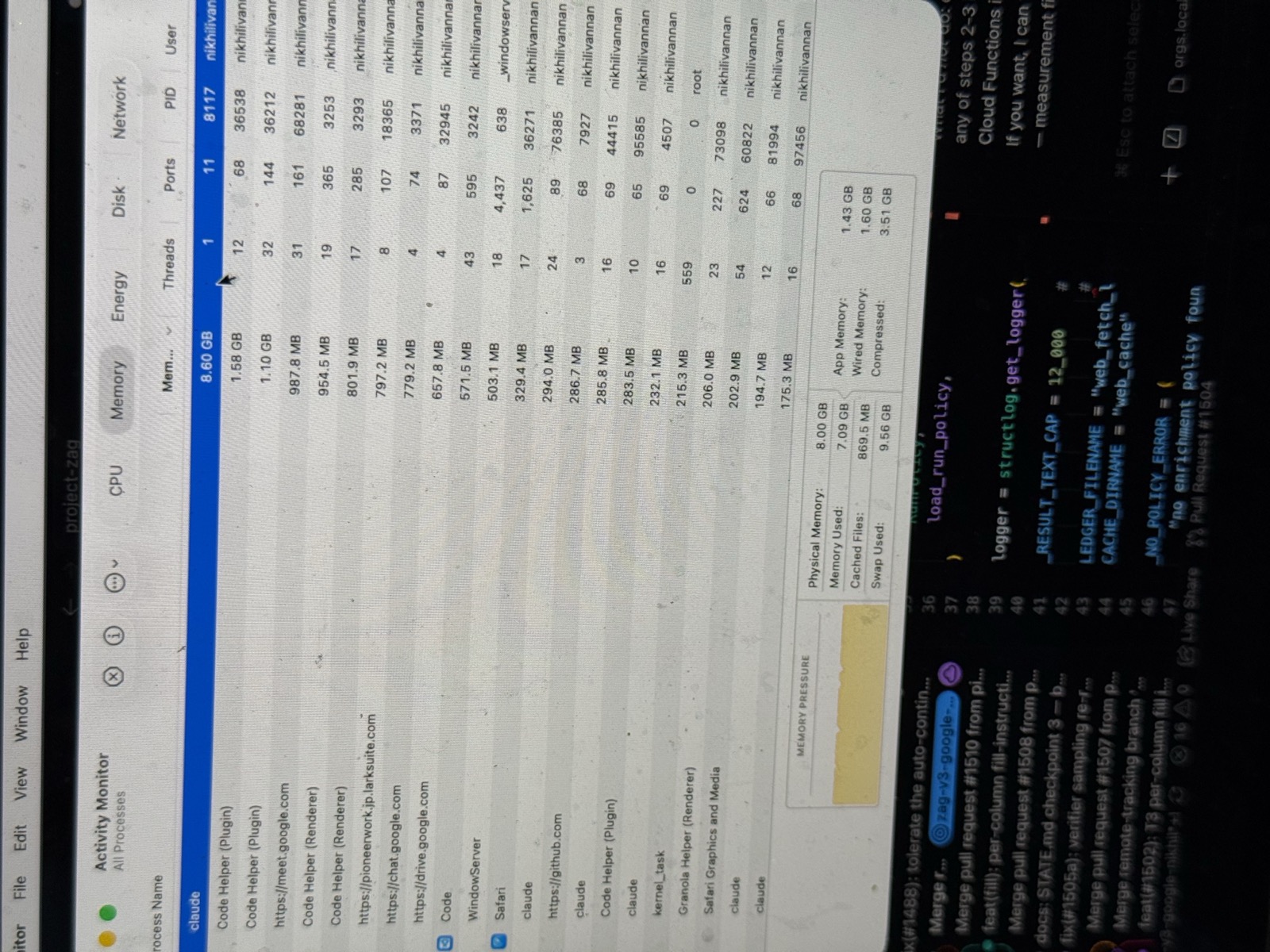
That is a single claude session eating more memory than my whole machine has, while the disk quietly swaps itself to death. Throw in VSCode, a Python language server, Docker, and the customary 30 browser tabs, and the memory-pressure graph lives in the red. The Air has no fans to scream — it just gets slow and sad.
The fix isn't a new laptop
The obvious move is "buy a 32GB MacBook." But a laptop upgrade is real money out of pocket, and — conveniently — my startup had PLENTY GCP credits sitting around. So instead of buying hardware I couldn't justify, I spent credits I already had.
The trick is old (hello, 1970s terminals) but modern tooling makes it feel magical: the laptop doesn't need to be the computer. It just needs to be the window to the computer.
- A VM in the cloud holds the code, the language servers, Docker, and Claude Code.
- My Air runs only the VSCode Remote-SSH client — basically a UI renderer. Keystrokes feel local; the heavy lifting happens elsewhere.
- Close the lid, and the cloud machine keeps working.
Same laptop. It just stopped pretending to be the brain. It's now the coolest, longest-battery-life machine I own, because it barely does anything.
What I rented
A few decisions worth stealing:
- ARM, not x86. My whole team is on Apple Silicon (aarch64). Renting an x86 box would make me the one person whose Docker images and native deps behave differently. I went ARM in the cloud too — Google's Axion c4a-highmem-4: 4 vCPUs, 32GB RAM, 150GB Hyperdisk. 4× the RAM I was starving for.
- Region for your fingers. Remote-SSH renders keystrokes locally, but terminal echo makes a round trip per character. I picked Mumbai (closest to me) and let the database calls eat the cross-region hop instead. Databases don't mind latency; humans do.
- No public IP, at all. The VM isn't on the internet. SSH goes through GCP's Identity-Aware Proxy (IAP), which authenticates my Google identity before a single packet reaches the box. No port 22 for the botnets, no
authorized_keysto babysit.
The tutorial: build it in six steps
1. Create the VM (ARM, no public IP)
gcloud compute instances create devbox \
  --zone=asia-south1-a \
  --machine-type=c4a-highmem-4 \
  --image-family=ubuntu-2404-lts-arm64 \
  --image-project=ubuntu-os-cloud \
  --no-address \
  --create-disk=boot=yes,type=hyperdisk-balanced,size=150
--no-address is the important bit: no external IP. You'll also need a subnet, Cloud NAT (so apt/npm can call out), and a firewall rule allowing tcp:22 from IAP's range 35.235.240.0/20.
2. Reach it through the IAP tunnel
No IP means SSH tunnels over IAP. Drop this in ~/.ssh/config and ssh devbox just works:
Host devbox
  HostName devbox
  User my_os_login_user
  IdentityFile ~/.ssh/google_compute_engine
  ProxyCommand gcloud compute start-iap-tunnel devbox 22 --listen-on-stdin --project=my-project --zone=asia-south1-a
  ServerAliveInterval 30
3. Open it in VSCode
Install Remote-SSH, Cmd+Shift+P → Connect to Host → devbox. VSCode installs its server on the VM; your editor UI is local, everything else is remote. This is the part that makes an 8GB laptop feel like a 32GB one.
4. Terminal: ghostty + tmux (the golden rule)
On the Mac, I live in ghostty — a fast, GPU-accelerated terminal that stays out of the way. On the VM, everything runs inside tmux. This one rule is what makes remote agentic coding actually work:
Always run Claude Code inside tmux.
Wifi blips. Laptops sleep. IAP tunnels drop. Without tmux, any of those kills your agent mid-task. With tmux, you reattach and the agent never noticed you were gone:
ssh devbox
tmux new -s work   # first time
claude             # kick off an agent, close your laptop, go get chai
# ...later, from anywhere:
ssh devbox && tmux attach -t work
It's the difference between "remote dev is flaky" and "remote dev is better than local."
5. Wrap the lifecycle in a Claude Code skill
The box has a whole lifecycle — provision, start, stop, status, snapshot, deprovision — and I did not want to memorize a gcloud incantation for each. So it's one idempotent bash script with those subcommands, wrapped in a Claude Code skill: a plain markdown file that teaches Claude when and how to run the script, plus guardrails so it can't do anything scary on its own.
# devbox skill
When I say "start the devbox", run `./devbox start` and wait for SSH.
Subcommands: provision · start · stop · status · snapshot · deprovision
NEVER run `deprovision` unless I explicitly ask — it deletes the machine.
Now my whole morning routine is: open VSCode, type "start the devbox" at Claude, wait ~30 seconds, connect. The machine is cattle, not a pet — provision rebuilds the subnet, NAT, firewall, VM, and full dev environment from zero (or restores the latest snapshot) with one command. If it vanished tomorrow, I would not lose a minute.
6. Make it turn itself off
A cloud devbox is only cheap if you engineer for the one failure mode: forgetting it's on. A tiny systemd timer checks every 10 minutes whether anyone's actually using the box — an established SSH connection, or a busy claude/pytest process so a long agent run doesn't get murdered mid-thought. After 90 minutes of true idleness, it powers itself off. A stopped VM bills ~$13/month for the disk and nothing for compute.
Without credits, my real usage (~10 hrs on weekdays) would land around ~$80/month — a mid-tier gym membership, for a machine 4× my laptop that sits next to the dev database and turns itself off when I forget about it.
Gotchas I hit so you don't have to
- Host keys + IAP. Plain
sshdoesn't know gcloud's host-key bookkeeping. You needUserKnownHostsFile ~/.ssh/google_compute_known_hostsand aHostKeyAlias compute.<instance-id>— and that ID changes every time you recreate the VM. - Daily reauth. If SSH suddenly dies with a cryptic "connection closed," run
gcloud auth loginbefore debugging anything else. Expired tokens break the IAP ProxyCommand. - Custom VPCs give you nothing for free. No-public-IP VM needs its subnet, NAT, and IAP firewall rule created explicitly. Forget the NAT and your first
apt updatehangs forever. - C4A needs Hyperdisk. Axion instances won't boot on the older Persistent Disk types.
Was it worth it?
Completely. The laptop upgrade I couldn't justify turned out to be a laptop demotion I could — running credits I already had, on a machine that's faster, cooler, and closer to my data than my Air ever was.
Same MacBook. Zero bytes of swap. No regrets.
Stack: MacBook Air 8GB → ghostty → VSCode Remote-SSH → IAP tunnel → GCP c4a-highmem-4 (ARM Axion, 32GB, Mumbai) → Ubuntu 24.04 + tmux + Claude Code.